Choosing org chart software comes down to three decisions: how your roster gets in and stays current, what the chart has to survive as the company grows, and what it costs to own. Get those right and the rest is taste. This page compares 12 tools across the paid and free end of the market, using the prices and limits each vendor publishes.
Which org chart software should you use?
Choose Org Chart Studio if
The pick when the chart itself is the job and you want to own the file.
- You have a roster and want a finished chart: import Excel or CSV and the layout arranges itself, with suggested matches for misspelled manager names instead of failed rows.
- You want to build before you decide: no account to start, 10 saved charts, and up to 2,500 people per chart.
- You want to pay once for a period of clean exports instead of a monthly subscription: a pass covers clean PNG, native PowerPoint, and vector PDF at your chart's size.
Choose something else if
The pick when the chart has to stay current on its own, or when the chart is one diagram among many.
- You need the chart to refresh from your HR system: ChartHop, OrgChart, and Pingboard sync live, and Organimi Premium connects to BambooHR, Rippling, and Personio.
- You want diagramming or a design canvas: Lucidchart and draw.io cover flowcharts and networks beside the org chart, and Canva and Miro fit when the chart has to be designed or argued out in a workshop.
- You already own the stack, or procurement sets the terms: Visio's Microsoft 365 bundle covers basic diagramming but its org chart templates start with Plan 1, SmartDraw sells annual licences only, and OrgChart quotes on one to three-year contracts.
Scroll left or right to compare13 options compared
| Feature | Org Chart Studio | Organimi Basic | Organimi Premium | ChartHop | Pingboard | OrgChart | Lucidchart | SmartDraw | Visio | draw.io | Miro | Canva | Syncfusion |
|---|---|---|---|---|---|---|---|---|---|---|---|---|---|
| Overview | |||||||||||||
| Classification | System of capture | System of capture | System of capture, or sync | Mirror | Mirror | Mirror | System of capture (manual) | System of capture (manual) | System of capture (manual) | System of capture (manual) | System of capture (manual) | System of capture (manual) | System of capture (manual) |
| Ecosystem lock-in | None | None | None | None | Workleap platform (HR suite account; standalone login retired) | None | None | None | Microsoft | None | None | None | None |
| Build & edit | |||||||||||||
| Start without an account | Yes | No | No | No | No | No (demo only) | Partial (free tier, signup req'd) | Yes (edit before signup; save needs account) | No (sign-in to Microsoft 365 required) | Yes (confirmed: no account) | No (account required to create boards) | No (account required to open the editor) | Yes (confirmed: no account) |
| Drag-and-drop editing | Yes | Yes | Yes | Yes | Yes | Yes | Yes | Yes (drag boxes to re-parent) | Yes (drag a subordinate onto a superior) | Yes (confirmed) | Yes (drag cards to reassign) | Yes (drag-and-drop editor) | Yes (confirmed) |
| Automatic layout | Yes | Yes | Yes | Yes | Yes | Yes | Yes | Yes (one type among many) | Yes (auto align and space; arrange subordinates) | Partial needs manual cleanup at scale | Yes (auto-layout in the org chart app) | No manual only | Yes |
| Matrix and dotted-line reporting | Planned | No | Yes | Yes | Yes (dotted lines and a Teams Matrix view; dotted lines cannot be imported via CSV or sync and are not included in exports) | Yes (Plus and above) | Yes (manual) | Yes (manual dotted line) | Yes (manual dotted-line connectors) | Yes (manual: dashed connectors) | Partial (manual: a second line drawn by hand) | Yes (manual: dashed or dotted connectors) | No (no connector or line-style control) |
| Custom fields per person | Yes (up to 5) | Yes | Yes | Yes (extensive) | Yes | Yes (formulas, picklists) | Partial (manual) | Yes (shape data fields) | Yes (shape data; employee fields on the paid plans) | Yes (custom properties on any shape) | Yes (custom fields on org-chart cards) | No (shape text only) | No (fixed person fields only) |
| Chart branding and themes | Yes | Yes | Yes | Yes | Yes | Yes | Yes | Yes (custom themes) | Yes (themes on every tier; pictures in drawings) | Yes (own colours, fonts and templates) | Yes (Brand Center from Starter; per-chart styling on all plans) | Yes (Brand Kits and Brand Templates) | Partial (per-node font and fill styling; no themes or logo) |
| Undo and redo | Yes | No (theme revert and snapshots instead) | No (theme revert and snapshots instead) | Partial revert-only, no true redo | No (no advertised chart-edit history) | Partial (Pro Changes panel reverts a change; no step-by-step undo) | Yes | Yes | Yes | Yes | Yes (all plans; 30 actions per session) | Yes | Yes (Cmd+Z undoes and Cmd+Y redoes in the shipped app) |
| Data import | |||||||||||||
| CSV and Excel import | Yes | Yes | Yes | Yes (CSV or Excel with column mapping) | Yes | Yes (flat-file + HRIS) | Yes (CSV/Excel/Sheets) | Yes (hierarchy from a supervisor column) | Partial (Excel, text, Exchange, or ODBC; matches the identifier you nominate) | Partial manual setup | Yes (CSV import on all plans) | No (org chart built manually) | No |
| Manager names matched despite typos | Yes | No (exact Manager ID field required) | No (same as Basic) | No manager column uses the same email or custom ID as the person identifier | No (reporting lines keyed by work email) | No (matches PersonID and SupervisorID) | No (use matching manager names or IDs) | No (exact manager name or ID match) | No (matches the chosen identifier) | No (exact name or ID match in the CSV join spec) | No (uses manager IDs or emails) | No (no roster import; reporting lines are drawn) | No (nodes are added by hand; no roster import to match) |
| HRIS export detected automatically | Planned | Partial (columns auto-suggested) | Partial (same as Basic) | N/A (native sync) | No | N/A (native sync) | No | Partial (column mapping) | No (worksheet, text file or Exchange source; no HRIS export format) | No (the vendor's import list has no HR-system export) | Partial (recognizes common column headings) | No (no HR-system export or import) | No (opens only its own saved diagram files; no roster import) |
| Live HRIS sync (Workday, ADP, UKG, etc.) | No | No | Yes (BambooHR, Rippling, Personio) | Yes | Yes (daily HRIS sync through Workleap settings; vendor pages show Workday, BambooHR, UKG Pro, and HiBob) | Yes 50+ integrations | No | No | No | No | No | No | No |
| Spreadsheet re-import with a review | Yes | Partial (updates chart; no change diff) | Partial (same as Basic) | Yes (native sync) | Yes (native sync) | Yes (native sync) | Partial (Enterprise: refresh, replace, or overlay a linked dataset) | Partial (replaces chart from the new file) | Partial (linked-data refresh with conflict resolution) | No (import inserts a new diagram) | Partial (CSV updates) | No (no update or review flow) | No (no spreadsheet import or update flow) |
| Export & sharing | |||||||||||||
| Free exports | Yes (watermarked PNG only; clean/other formats need a paid pass) | No (paid plan) | No | No | No | No | Yes (capped at 3 editable documents / 75 shapes per document) | Partial (Visio export advertised in trial) | Partial (bundled tier saves PNG and JPEG; requires a Microsoft 365 subscription) | Yes | Yes (deeper exports paid) | Yes (PNG/JPG/PDF-Standard) | Yes |
| PNG export | Yes (watermarked free) | Yes | Yes | Yes | Yes | Yes | Yes | Yes (PNG in vendor export list) | Yes | Yes | Yes | Yes | Yes |
| Vector PDF export | Yes | Yes | Yes | Yes | Yes | Yes | Yes | Partial (SVG-to-PDF conversion) | Yes (desktop Visio) | Yes | Yes | Partial (Standard free; Print/CMYK paid) | No (exports JPG, PNG or SVG; no PDF) |
| Editable PowerPoint export | Yes | No (PowerPoint export; native shape editing not advertised) | No (PowerPoint export; native shape editing not advertised) | Partial | No (the documented chart download flow offers PNG or PDF only) | No (PowerPoint export; native shape editing not advertised) | No (PowerPoint export; native shape editing not advertised) | No (Office export pastes a bitmap) | No (slide snippets arrive as pictures) | No (no PPTX export; PNG, JPEG, SVG, PDF and XML) | No (images, PDF and CSV only) | Partial (convert to a presentation first) | No (exports JPG, PNG or SVG; no PowerPoint) |
| CSV / data export | Yes | Yes | Yes | Yes | Yes | Yes | Partial | Yes (org chart + shape data CSV) | Partial (desktop exports organization data to Excel or text) | No (XML or JSON, not CSV) | Yes (org chart exports CSV) | No (no org-chart roster export) | No (no CSV export; JPG, PNG or SVG only) |
| Shareable links | Planned | Yes | Yes | Yes | Yes | Yes | Yes | Yes (link sharing, view or view+edit) | Yes (OneDrive or SharePoint sharing, including people without a licence) | Yes (URL or published link) | Yes (public board link) | Yes (link sharing; named public view links are Pro) | No (no share control; the vendor's sharing section means exporting a file) |
| Embed on a page | Planned | Yes | Yes | Partial | Yes (shared org chart link inside an iframe; designed for a website or intranet) | Partial | Yes | Yes (embed code) | Yes (embed code for a web or SharePoint page) | Yes (HTML or iFrame embed) | Yes (embed code on all plans) | Yes (HTML or smart embed; private embeds Enterprise-only) | No (no embed option; the served tool refuses framing) |
| Agent / MCP / API access | Yes (MCP, llms.txt, OpenAPI) | No | No (API is Enterprise only) | Partial (API) | Partial (platform level: MCP access and API access are listed in Workleap's Pro plan) | Partial (API) | Yes — Lucid's own Plans page lists a "Lucid MCP server," available Free through Enterprise | Yes (confirmed: SmartDraw offers an API) | Partial (Office add-in JavaScript API documented for Visio on the web; no REST/Graph diagram API or MCP server found) | Yes (official MCP server) | Yes — confirmed: miro.com/pricing states Miro connects to "Claude, Cursor, or Copilot via the MCP server" | Partial (REST API on Enterprise) | No (no API or MCP for the free maker; the SDK is a separate product) |
| Scale & structure | |||||||||||||
| Max people per chart (self-serve) | 2,500 self-serve; 2,500+ available, but requires contacting OCS directly (not self-serve) | 2,500 people; larger plans by quote | 2,500 people; larger plans by quote | Not published; the enterprise tier scales to thousands | No published chart-size cap; Enterprise is quoted for organizations with more than 250 employees | Unlimited (enterprise) | Limited by shape count | No published hard cap; vendor recommends fewer than 200 people per org chart | N/A (general canvas) | N/A (general canvas) | N/A (general canvas) | N/A (general canvas) | N/A (general canvas) |
| Position/vacancy management | Yes | Yes (vacant roles + hire-by date) | Yes | Yes | Yes (open roles with job titles and hiring roles with descriptions and listing links; open roles stay out of the directory, headcount, and data exports) | Yes (Plus and above) | No | Partial (manually labeled position shapes) | Partial (shapes can stand for vacancies; no position tracking) | Partial (manual placeholder shape; no vacancy state) | Yes (Hiring field marks an open or vacant position) | Partial (manual placeholder shape; no vacancy state) | No (the node model is a person; no position records) |
| Workforce planning scenarios | Yes (separate charts for scenarios; custom cost fields; CSV export for spreadsheet totals) | Yes (separate planning charts; custom cost fields) | Yes (separate planning charts; custom cost fields) | Yes | Partial | Yes | No | Partial (manual chart copies) | Partial (restructuring and planning diagrams; no headcount or cost rollups) | Partial (separate diagrams and custom cost properties; no rollup) | Yes (manual scenarios within 3 boards) | Partial (manual scenario boards; no rollup) | Partial (staffing changes are made by hand; no headcount or cost rollups) |
| Enterprise & security | |||||||||||||
| SSO / SAML | No | No | Yes | Yes | Yes (SSO listed in Standard; SAML SSO listed in Pro) | Yes | Yes (Google/M365 all tiers; SAML Enterprise-only) | Yes Enterprise-only | Partial (sign-in through the Microsoft 365 tenant) | No | Yes Business+ | Yes Enterprise | No (no account or sign-in, so no SSO) |
| Admin/permission groups | Partial (basic) | Yes | Yes | Yes | Yes | Yes (branch-level security) | Yes | Yes (Editor/ReadOnly/Admin groups) | Partial (tenant-level licensing and access, administered in Microsoft 365) | No (no accounts or groups; access comes from your storage) | Yes (advanced board sharing permission from Starter) | Yes (roles from Business; restricted sharing Enterprise) | No (no accounts, roles or sharing lists) |
| SOC 2 | No | No (no public attestation) | No (no public attestation) | Yes SOC 2 Type 2 examination completed (charthop.com) | Yes (SOC 2 Type I report, 2025; the Workleap trust center scope names Workleap Pingboard) | Yes | Yes | Yes (SOC 2 Type II, annual audit) | Yes (Microsoft) | No (no public attestation) | Yes (SOC 2 Type II listed on the pricing page) | Yes confirmed on canva.com/pricing | Yes (vendor publishes a SOC 2 Type 2 report for its service organisation) |
| Pricing model | |||||||||||||
| Free plan | Yes (10 saved charts, build to 2,500 people; watermarked PNG export free to org size of 250 people) | Yes 25 employees, 1 admin, 1 chart | No 14-day trial only | No | No | No (no free plan; annual terms) | Yes 3 editable documents, 75 shapes per document | No 7-day trial | Partial (included with Microsoft 365 commercial plans; basic diagrams; org charts only partially supported — pictures and employee fields unavailable; org chart templates start at Plan 1) | Yes 100% free forever | Yes unlimited members, 3 editable boards | Yes free plan | Yes free forever |
| One-time export passes | Yes (only option; tiered by size) | No | No | No | No | No | No | No | No (per-user subscription or a perpetual license; no export passes) | N/A (free) | No | No | N/A (free) |
| Subscription | $100/year for exports of charts up to 250 people (annual pass) | $240/year for up to 250 people | $480/year for up to 250 people | $5/employee/mo Core, billed annually; modules $3–4/employee/mo; volume pricing available; no minimum published | Platform price, no per-seat unit published: Standard starts at $4,999/year, Pro at $11,999/year, billed annually; Enterprise quoted above 250 employees | From $105/mo for 100 employees charted, billed annually ($1,260/yr Core); Plus $157/mo and Pro $263/mo at that size; scales with employees charted; 1–3-year contracts | $108/yr Individual; Team $10/user/mo billed annually | Individual $131.40/year; vendor recommends fewer than 200 people per org chart | Plan 1 $5.00/user/mo paid yearly (web app); Plan 2 $15.00/user/mo paid yearly (web and desktop) | N/A | Starter $8/member/mo annual | Pro $144/yr; Business $250/yr, no seat min | N/A |
What actually matters when choosing org chart software
Twelve tools, one set of questions. Here is what an organizational chart software decision actually turns on, with each answer stated as a fact you can check on a vendor page.
Can a non-technical owner run it? The file-based tools are the quickest to start: Org Chart Studio, draw.io, and Syncfusion open in a browser without an account, and SmartDraw lets you edit before you sign up. Visio, Organimi, Lucidchart, and Miro begin with a signup, while ChartHop, OrgChart, and Pingboard route through a demo. For those file-based tools, a chart is a roster and a file rather than a system migration. The platform purchases in this group are the ones that arrive with a demo, a data connection, and an administrator.
Can it read the roster you already have? CSV or Excel import is table stakes: Lucidchart, SmartDraw, Visio, ChartHop, Organimi, Miro, and Org Chart Studio all accept a spreadsheet. The difference shows up on a misspelled manager name. Org Chart Studio suggests candidates instead of dropping the row, SmartDraw requires the supervisor's name or ID to match exactly, Organimi requires a Manager ID that matches an employee row, and Lucidchart builds reporting lines from manager names or employee IDs. Keep those identifiers consistent in the source file.
Does the chart stay current on its own? This is the dividing line in the market. ChartHop, OrgChart, and Pingboard sync from HR systems, and Organimi Premium connects to BambooHR, Rippling, and Personio. Org Chart Studio, SmartDraw, Visio, draw.io, Canva, Miro, and Syncfusion do not, so their charts update when someone brings a new file or edits the canvas.
What happens at scale? Org Chart Studio builds to 2,500 people per chart, and larger organizations contact us. Organimi Basic and Premium cover 2,500 people before moving to a quote. SmartDraw's own guidance recommends keeping a chart under 200 people, Lucidchart counts shapes rather than people and allows 75 on its free plan, and Pingboard publishes no chart-size cap.
What is actually in the export? Org Chart Studio's PowerPoint export is editable shapes and native text, and its PDF is vector. Lucidchart and OrgChart also export PowerPoint presentations, but neither advertises native shape editing in those files. Pingboard exports PNG and PDF. SmartDraw's Office export pastes a bitmap into the slide, and Visio slide snippets arrive as pictures. If the deck gets edited after you send it, this difference decides the tool.
What does it cost to own, and who shares it? Four pricing models are in play, and the units do not line up: per seat, per employee in the company, a flat annual plan by chart size, and a timed export pass. Sharing is a separate decision. Several vendors in this group share a chart by link or embed, while Org Chart Studio currently shares through the exported file.
The 12 tools, compared
The list is grouped by the job each tool does best rather than by rank. Prices are the vendors' published figures for a single annual individual user or an organization-size plan, checked in September 2026.
Purpose-built chart tools
Org Chart Studio. A browser chart tool for managers rather than a people platform. Building is free to 2,500 people per chart with 10 saved charts, Excel and CSV import resolves misspelled manager names, and the layout arranges itself. Clean PNG, editable PowerPoint, and vector PDF come from a timed pass rather than a subscription: the annual pass covers charts up to 250 people for $100. The limit is deliberate: import is a file you bring, not a live HR connection, and there is no simultaneous editing.
Organimi. Flat annual pricing by headcount, with a free plan at 25 employees, then $240/year for Basic and $480/year for Premium up to 250 people. Premium adds matrix and dotted-line reporting, HR connectors to BambooHR, Rippling, and Personio, SSO, and unlimited admins, while Basic handles vacant roles with a hire-by date. The trade-off is precision over convenience: supervisor rows are matched by an exact Manager ID, and the Organimi alternative guide breaks down which tier carries which feature.
Syncfusion Org Chart Maker. A free browser tool with no account and no published cap. It ships auto-adjusting layouts, re-layout controls, orientation and spacing settings, and template starting points, and it exports JPG, PNG, or SVG. You add people in the editor rather than importing a roster. Its download menu offers JPG, PNG, and SVG, so it is a fit for an image or web graphic rather than a PowerPoint handover.
HR platforms that keep the chart current
ChartHop. A people analytics platform with an org chart inside it. Core is $5 per employee per month billed annually, which is about $15,000 a year at 250 employees, with modules at $3 to $4 for HRIS, headcount planning, compensation, and performance. It holds a two-way ADP Workforce Now sync and integrations with Greenhouse and Ashby, and it has completed a SOC 2 Type 2 examination. There is no free plan, and the per-employee unit means the price follows headcount rather than the chart, as the ChartHop alternative guide details.
OrgChart. The enterprise option for organizations that want position management rather than a picture of people. Core starts at $105/month for 100 employees charted, billed annually on one to three-year contracts, and the price rises with the records you chart. It carries 50+ certified connectors, including ADP, Workday, UKG, Dayforce, Paychex, and isolved, with position-based charts on Plus, workforce planning on Pro, branch-level access groups, SAML SSO, and SOC 2 Type II. PowerPoint export editability is not something the vendor states, so treat the deck question as open. The OrgChart alternative guide covers the tiers.
Pingboard. A people directory with charting on top, now sold as part of Workleap. The platform starts at $4,999/year for Standard and $11,999/year for Pro, billed annually, with the org chart and directory in Standard and SAML SSO, MCP, and API access in Pro. It syncs daily from systems including Workday, BambooHR, UKG Pro, and HiBob, tracks open roles and hiring roles, and embeds on an intranet page. Downloads are PNG and PDF only, and there is no per-seat price because the purchase is a platform plan. See the Pingboard alternative guide.
Diagramming suites
Lucidchart. A general diagramming suite whose org chart feature imports from CSV, Excel, and Google Sheets. One Individual seat is $108/year, and the free plan holds 3 editable documents capped at 75 shapes per document. Sharing by link and embed works on every tier, a Lucid MCP server is listed from Free upward, and SAML arrives with Enterprise. Refresh or replace for a linked dataset is Enterprise-only, so a free or Individual import is a one-time build, and PowerPoint is not an export format. The Lucidchart alternative guide covers the rest.
SmartDraw. A diagramming tool that treats org charts as one of many diagram types. Licences are annual only at $131.40/year for one Individual user, with no monthly option, and the vendor's own guidance recommends keeping a chart under 200 people. Import reads CSV, XLS, or XLSX and requires the supervisor's name or ID to match the employee row exactly, and exports cover PNG, PDF, SVG, and a CSV of shape data. Office export pastes a bitmap rather than producing an editable slide. The SmartDraw alternative guide covers the licensing.
Microsoft Visio. The incumbent for Microsoft shops. Plan 1 is $5.00 per user per month and Plan 2 is $15.00, both paid yearly, and the desktop app is Plan 2 only. Visio is also bundled with Microsoft 365 commercial plans, but the bundle is for basic diagrams: org chart templates start at Plan 1, and the bundled version omits features such as pictures and employee fields. Data import runs through Excel, Exchange, or ODBC, and permissions are administered at the tenant level. Slide snippets arrive as pictures. The Visio alternative guide works through the tiers.
draw.io. Open source and free, with no account and no published document or object cap. Exports include PNG, JPEG, SVG, PDF, WEBP, and XML, diagrams embed in docs and wikis, and files stay portable on your own storage. CSV import exists but you build the mapping yourself, there is no HRIS connection, and upkeep is manual, so it suits someone who thinks in shapes rather than someone maintaining a 600-person chart.
Design canvases and whiteboards
Canva. A design tool with org chart templates rather than an org chart feature. The free plan includes over a million templates, 5 GB of storage, and one Brand Kit, with PDF, JPG, and PNG export; Pro is $144/year per person and Business is $250/year per person, which add print-ready and CMYK output and brand controls. There is no structured roster import and no automatic layout, so every box is placed by hand. If you are looking for a Canva alternative specifically for org charts, that manual hierarchy is the difference that matters.
Miro. A collaborative whiteboard where the org chart is a shared artefact. The free plan gives unlimited members 3 editable boards, Starter is $8 per member per month billed annually, and Business is $20. Live Embed, templates, and an MCP connection are included, with SAML from Business up, and free board exports are low-resolution; the org chart exports to CSV on every plan. Its org chart tool imports a CSV roster, auto-detects common header names like PersonID and SupervisorID, and arranges the cards itself, so the chart can be built from data and updated by re-uploading the file.
How to choose the best org chart software
Four checks, run against any shortlist.
- Import your messiest real roster. Take an export with duplicate names and a misspelling or two. If the tool hands the unresolved rows back to you, that is the maintenance cost you are signing up for.
- Open a sample export and try to edit a name. If the deck is a picture, the chart stops being a working document the moment it leaves the tool, and every update means a rebuild.
- Ask what the unit is. Per seat, per employee, per chart size, or per pass. Two tools with similar headline prices can diverge fast when one charges for every person in the company and the other charges for the people the export contains. The pass tiers show how our sizes and durations work.
- Decide who owns it before you buy. A chart one manager maintains is a file. A chart that has to stay current is a data connection with an administrator, and that is a different purchase with a different renewal.
What an org chart looks like at 10, 100 and 2,500 people
At 10 people the chart is a picture of the team. Any of these tools produces it in an afternoon, and the choices that matter are whether you can import a roster and whether the file still looks right in a deck.
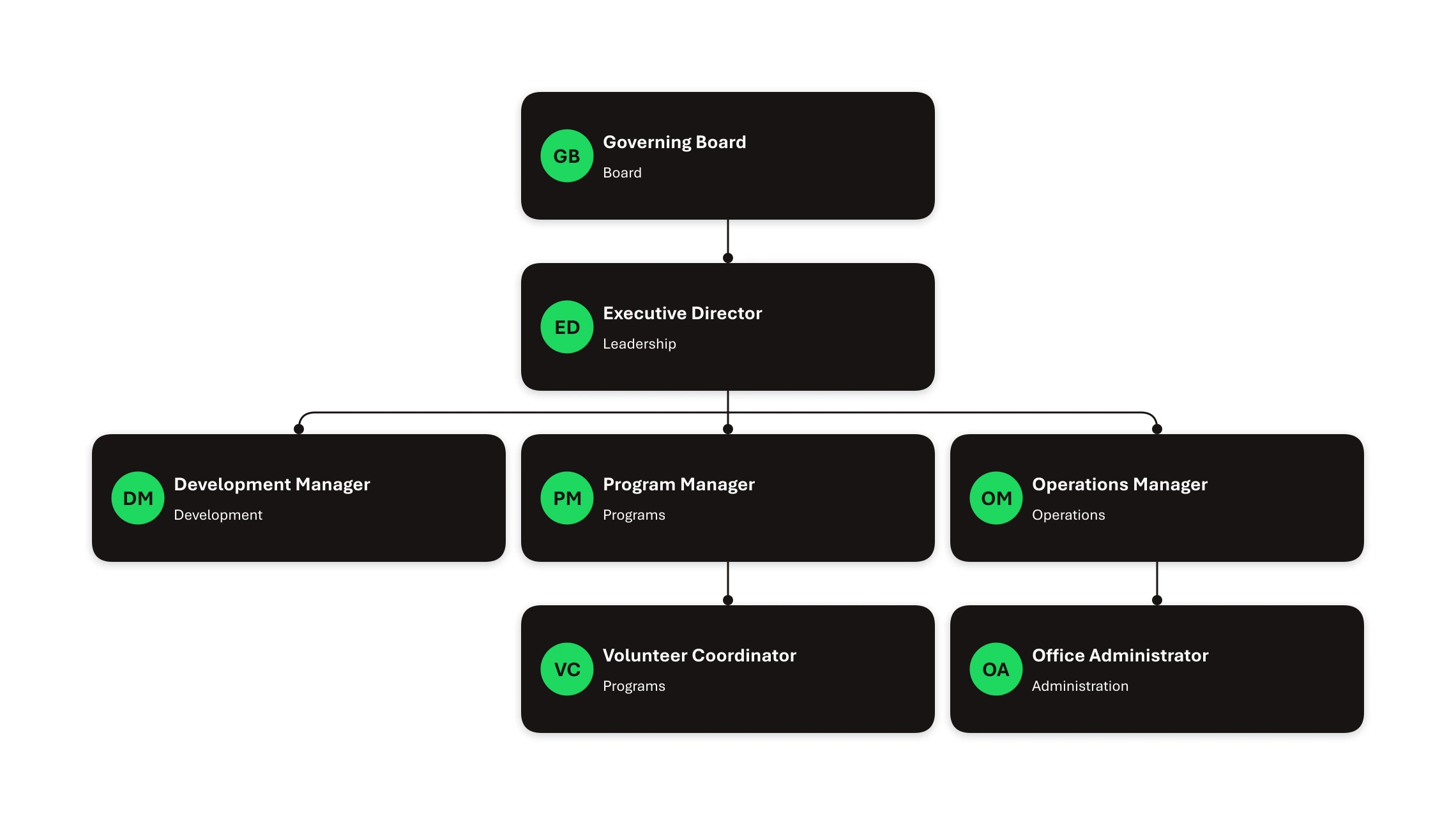
One theme, applied across the chart
Org Chart Studio's Wrapped theme, with each manager's branch stacked beneath them and compact spacing that keeps a seven-role nonprofit chart easy to scan.
At 100 people the chart becomes a document someone maintains. This is where shape limits and layout matter: Lucidchart's free plan allows 75 shapes per document, SmartDraw's guidance suggests staying under 200 people, and Org Chart Studio and Organimi both build to 2,500. The Excel import guide covers getting a roster of this size in cleanly.
At 2,500 people legibility is an export problem as much as a drawing problem. Org Chart Studio exports at the size you selected, from one wide page to a per-team deck with an index, and the CSV import guide covers the roster side. Cloud platforms in this group lean on search and filtering instead, which is why Pingboard publishes no chart-size cap and OrgChart scopes access by branch.
What org chart software costs
- Per seat: Lucidchart is $108/year for one Individual seat. Miro Starter is $8 per member per month billed annually, and Business is $20. Visio is $5.00 per user per month for Plan 1 and $15.00 for Plan 2, paid yearly.
- Per employee: ChartHop Core is $5 per employee per month billed annually, about $15,000 a year at 250 employees, with modules at $3 to $4.
- Per employee charted: OrgChart starts at $105/month for 100 employees charted, billed annually on contracts of one to three years.
- Flat annual plans for the people you chart: Organimi Basic is $240/year and Premium $480/year up to 250 people.
- Single annual licence: SmartDraw Individual is $131.40/year, with no monthly option.
- Platform plan: Workleap, which owns Pingboard, is $4,999/year for Standard and $11,999/year for Pro, billed annually.
- Timed export passes: Org Chart Studio sells a pass rather than a subscription. The annual pass covers charts up to 250 people for $100, and every clean export you make while it is active is included. Passes are also sold by day, week, and month at smaller sizes.
- Free tiers: draw.io and Syncfusion are free to use with no paid tier for the chart tool itself. Canva, Miro, and Organimi have free plans with published caps, and Org Chart Studio builds free to 2,500 people per chart with a watermarked PNG export up to 250 people and free CSV.
The org chart software comparison covers the wider field.
Administration and collaboration: what the chart cannot do on its own
A file-based chart is handed over rather than administered. One person keeps the roster, imports the new file, and exports the result, and the chart lives on one account with 10 saved slots. Anyone who needs a copy gets one: a watermarked PNG for charts of up to 250 people and CSV data for free, or clean PNG, vector PDF, and editable PowerPoint with a pass. For a chart that changes a few times a year, that is the whole operating model, and it is usually enough.
If the chart has to stay current on its own, the purchase changes shape. ChartHop, OrgChart, and Pingboard sync from HR systems, and Organimi Premium connects to BambooHR, Rippling, and Personio. Those plans bring the SSO, permission groups, and procurement language that HR and IT review together. When several people need to work on one diagram at once, Lucidchart and Miro are built for that, while SmartDraw, Visio, Organimi, Pingboard, and OrgChart share a chart by link or embed.
If your budget is zero, the free org chart software comparison prices out each free plan, ours included.
Frequently asked questions
No. Import is file based: export a CSV or Excel roster from your HR system and upload it, then work through the Needs manager list for any line the import could not resolve. The CSV guide and the BambooHR guide cover the handoff. If the chart has to refresh itself, ChartHop, OrgChart, and Pingboard sync from HR systems, and Organimi Premium connects to BambooHR, Rippling, and Personio.
Lucidchart and Miro, when several people need to work in the same file. Lucidchart imports a roster from CSV, Excel, or Google Sheets and shares the result by link or embed, and Miro is built for a group working on one canvas. SmartDraw, Visio, Organimi, Pingboard, and OrgChart share a chart by link, with role-based access on most of them. Org Chart Studio shares by export today, with link sharing on the roadmap, and it has no simultaneous editing or comment threads.
Ask what the tool counts, and what changes at your headcount. Lucidchart counts shapes per document and allows 75 on its free plan, SmartDraw recommends keeping a chart under 200 people, and Pingboard publishes no cap. Org Chart Studio builds to 2,500 people per chart, so size changes the pass you buy rather than whether the chart can exist.
Four models. Per seat: Lucidchart $108/year, Miro $8 per member per month billed annually, Visio $5.00 to $15.00 per user per month billed annually. Per employee: ChartHop $5 per employee per month billed annually. Flat annual: Organimi from $240/year for up to 250 people, Workleap from $4,999/year, OrgChart from $105/month for 100 employees charted, billed annually. Timed passes: Org Chart Studio, $100 for a year of clean exports up to 250 people.
Not for most of this list. Org Chart Studio, draw.io, and Syncfusion all work in a browser without an account, and SmartDraw lets you edit before you sign up. Visio, Organimi, Lucidchart, and Miro start with a signup, while ChartHop, OrgChart, and Pingboard route through a demo. OrgChart publishes no free plan and bills annually.
A tool that does not charge per seat for a chart one person maintains. Org Chart Studio builds and stores 10 charts free, up to 2,500 people each, and clean exports are a pass rather than a subscription. The free org chart software comparison covers the free plans.