Free org chart software is only useful if it lets you finish the chart you came for. Three things decide that: what the plan lets you build, how your roster gets in, and what the finished file costs.
Every plan on this page is a lasting free plan rather than a trial, and every limit below comes from the vendor's own pricing or help pages, checked in September 2026. We make Org Chart Studio, so it goes first, with its limits stated as plainly as everyone else's.
The best org chart software for free in 2026
Choose Org Chart Studio if
The pick when the chart is the whole job.
- You want a free plan measured in people: 10 charts, up to 2,500 people each.
- You have a roster, not a design brief, and you want the hierarchy and the layout handled.
- You want a watermarked PNG export free to 250 people, CSV export always free, and clean exports sold as one-time passes.
Choose another free tool if
The pick when the chart is one diagram among several, or you want to place every box yourself.
- You also draw flowcharts, networks, or floor plans: draw.io is free forever with no published limit, and Lucidchart's free plan is a real editor with a 3-document cap.
- You want a design canvas or a live whiteboard: Canva's free plan exports PDF, JPG, and PNG, and Miro's free plan gives you 3 boards.
- You need one small chart and nothing more: Organimi's free plan covers 25 employees, and Syncfusion's browser tool needs no account.
Free org chart software comparison table
Scroll left or right to compare7 options compared
| Feature | Org Chart Studio Free | Lucidchart Free | Organimi Free | draw.io Free | Miro Free | Canva Free | Syncfusion Free |
|---|---|---|---|---|---|---|---|
| Overview | |||||||
| Classification | System of capture | System of capture (manual) | System of capture | System of capture (manual) | System of capture (manual) | System of capture (manual) | System of capture (manual) |
| Ecosystem lock-in | None | None | None | None | None | None | None |
| Build & edit | |||||||
| Start without an account | Yes | Partial (signup required) | No | Yes | No (account required to create boards) | No (account required to open the editor) | Yes |
| Drag-and-drop editing | Yes | Yes | Yes | Yes | Yes (drag cards to reassign) | Yes (drag-and-drop editor) | Partial (a drag moves a node but does not re-parent it; re-layout restores the tree) |
| Automatic layout | Yes | Yes | Yes | Partial | Yes (auto-layout in the org chart app) | No | Yes |
| Matrix and dotted-line reporting | Planned | Yes (manual) | No (Premium only) | Yes (manual: dashed connectors) | Partial (manual: a second line drawn by hand) | Yes (manual: dashed or dotted connectors) | No (no connector or line-style control) |
| Custom fields per person | Yes (up to 5) | Partial (manual) | Yes (basic custom fields) | Yes (custom properties on any shape) | Yes (custom fields on org-chart cards) | No (shape text only) | No (fixed person fields only) |
| Chart branding and themes | Yes | Partial (premium templates are paid) | Partial (basic formatting; watermarked exports) | Yes (own colours, fonts and templates) | Partial (per-chart styling on all plans; Brand Center from Starter) | Partial (1 Brand Kit on the free plan) | Partial (per-node font and fill styling; no themes or logo) |
| Undo and redo | Yes | Yes | No (theme revert and snapshots instead) | Yes | Yes (free plan explicitly in scope) | Yes | Yes (Cmd+Z undoes and Cmd+Y redoes in the shipped app) |
| Data import | |||||||
| CSV and Excel import | Yes | Yes (CSV/Excel/Sheets) | Yes | Partial (manual setup) | Yes (CSV import on all plans) | No (org chart built manually) | No |
| Manager names matched despite typos | Yes | No (use matching manager names or IDs) | No (reporting lines keyed by ID; the person key is email) | No (exact name or ID match in the CSV join spec) | No (uses manager IDs or emails) | No (no roster import; reporting lines are drawn) | No (nodes are added by hand; no roster import to match) |
| HRIS export detected automatically | Planned | No | Partial (columns auto-suggested) | No (the vendor's import list has no HR-system export) | Partial (recognizes common column headings) | No (no HR-system export or import) | No (opens only its own saved diagram files; no roster import) |
| Live HRIS sync (Workday, ADP, UKG, etc.) | No | No | No (Premium and above) | No | No | No | No |
| Spreadsheet re-import with a review | Yes | No (refresh or replace is paid) | Partial (updates chart; no change diff) | No (import inserts a new diagram) | Partial (CSV updates) | No (no update or review flow) | No (no spreadsheet import or update flow) |
| Export & sharing | |||||||
| Free exports | Yes (watermarked PNG for charts up to 250 people; CSV data export free) | Yes (3 editable documents, 75 shapes per document) | Yes (watermarked PDF, PNG and PowerPoint) | Yes | Partial (low-resolution only) | Yes (PNG/JPG/PDF-Standard) | Yes |
| PNG export | Yes (watermarked, up to 250 people) | Yes | Yes (watermarked) | Yes | Partial (low-resolution only) | Yes | Yes |
| Vector PDF export | No (requires a pass) | Yes | Yes (watermarked) | Yes | Partial (low-resolution only) | Partial (Standard free; Print/CMYK paid) | No (exports JPG, PNG or SVG; no PDF) |
| Editable PowerPoint export | No (requires a pass) | No (PowerPoint export; native shape editing not advertised) | No (PowerPoint export; native shape editing not advertised) | No (no PPTX export; PNG, JPEG, SVG, PDF and XML) | No (images, PDF and CSV only) | Partial (convert to a presentation first) | No (exports JPG, PNG or SVG; no PowerPoint) |
| CSV / data export | Yes | Yes | Yes | No (XML or JSON, not CSV) | Yes (CSV export on all plans) | No (no org-chart roster export) | No (no CSV export; JPG, PNG or SVG only) |
| Shareable links | Planned | Yes (passcode and expiry are paid) | Yes | Yes (URL or published link) | Yes (public board link on all plans) | Yes (link sharing on Free; named public view links are Pro) | No (no share control; the vendor's sharing section means exporting a file) |
| Embed on a page | Planned | Yes | Yes | Yes (HTML or iFrame embed) | Yes (embed code on all plans) | Yes (public HTML or smart embed on Free) | No (no embed option; the served tool refuses framing) |
| Agent / MCP / API access | Yes | Yes (MCP server included) | No (API is Enterprise-only) | Yes (official MCP server; no paid tier) | Yes (MCP included) | No (REST API is Enterprise-only) | No (no API or MCP for the free maker; the SDK is a separate product) |
| Scale & structure | |||||||
| Max people per chart (self-serve) | 2,500 people to build; free PNG exports up to 250 people | 75 shapes per document | 25 employees, 1 chart | N/A (general canvas) | N/A (general canvas) | N/A (general canvas) | N/A (general canvas) |
| Position/vacancy management | Yes | No | Yes (vacant roles) | Partial (manual placeholder shape; no vacancy state) | Yes (Hiring field marks an open or vacant position) | Partial (manual placeholder shape; no vacancy state) | No (the node model is a person; no position records) |
| Workforce planning scenarios | Yes (separate charts for scenarios; custom cost fields; CSV export for spreadsheet totals) | No | No (one chart) | Partial (separate diagrams and custom cost properties; no rollup) | Yes (manual scenarios within 3 boards) | Partial (manual scenario boards; no rollup) | Partial (staffing changes are made by hand; no headcount or cost rollups) |
| Enterprise & security | |||||||
| SSO / SAML | No | Partial (Google/M365 sign-in; SAML is paid) | No | No | No | No (Enterprise only) | No |
| Admin/permission groups | No | No (organizational groups are paid) | No (1 admin) | No (no accounts or groups; access comes from your storage) | No (advanced sharing permissions start at Starter) | No (roles and restricted sharing are paid) | No |
| SOC 2 | No | Yes | No (no public attestation) | No (no public attestation) | Yes (SOC 2 Type II, company-wide) | Yes | Yes (vendor publishes a SOC 2 Type 2 report for its service organisation) |
| Pricing model | |||||||
| Free plan | Yes (10 saved charts, build to 2,500 people; watermarked PNG export free to org size of 250 people) | Yes 3 editable documents, 75 shapes per document | Yes 25 employees, 1 admin, 1 chart | Yes 100% free forever | Yes unlimited members, 3 editable boards | Yes free plan | Yes free forever |
| One-time export passes | No (clean exports need a separate one-time pass) | No (paid plans only) | No (paid plans only) | N/A (free) | No (paid plans only) | No (paid plans only) | N/A (free) |
| Subscription | No | No | No | No | No | No | No |
What "free" actually means in org chart software
The word free covers three business models, and the difference shows up the moment you need the file: software that genuinely costs nothing, a paid product with a free tier, and a trial with a friendly name.
Genuinely free. draw.io is what freeware used to promise: open source, no sign-up, and no paid tier for the web or desktop app. Nothing expires, because there is nothing to buy.
A free tier with limits. This is most of the market, including us. Lucidchart's free plan holds 3 editable documents of 75 shapes each and 100 templates, and the full Lucidchart comparison covers what the paid tiers add. Organimi's free plan covers 25 employees, 1 admin user, and 1 org chart, which the Organimi alternative breaks down against the paid editions. Miro's gives you 3 boards. Canva's includes templates, 5 GB of storage, and PDF, JPG, and PNG export. Those limits are published by each vendor, and each one marks where the free plan ends.
A trial wearing a free label. A trial is useful when you know that is what you are testing, and a trap when you expected something that still works next month. SmartDraw's free option is a 7-day trial rather than a plan, and it belongs with the paid tools in the full org chart software comparison.
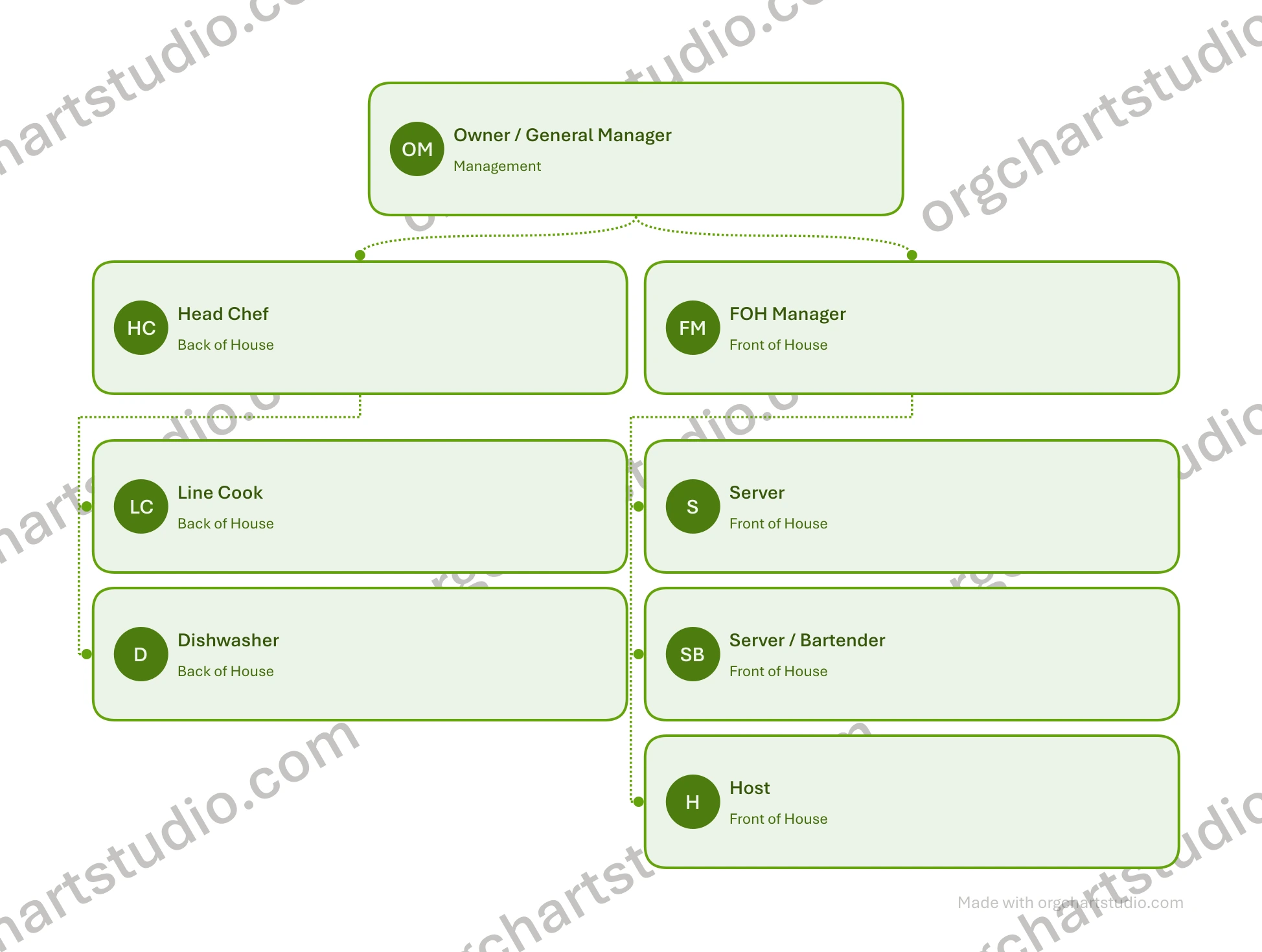
What the free export looks like
The free PNG export from Org Chart Studio: the Meadow theme, teams stacked under their managers with compact spacing, and the tiled orgchartstudio.com watermark that a one-time pass removes.
For getting a chart done in 10 minutes
Speed is the first thing a free plan has to get right, because the chart is usually due before the next meeting. When that is the case, the best org chart tool is the one you can start using in the next minute without an account.
Org Chart Studio: build first, sign in later
You can start building without an account. The chart lives in your browser as a draft, and signing in is what saves it or exports it, so there is no signup wall between you and the first version. Add people and the automatic layout keeps the branches straight, which matters at the size where dragging boxes stops being fun. One theme covers the cards, avatars, and connectors across the whole chart, so the output looks designed from the first click rather than after an afternoon of styling.
The free plan stores 10 charts and builds up to 2,500 people in each. A watermarked PNG export is free through 250 people, and CSV export is always free, so the data can leave as easily as it arrived.
Syncfusion: a free browser tool with no account
Syncfusion's free org chart tool runs in the browser with no download and no signup. It carries the layout controls you want for a quick chart, including orientation, subtree alignment, horizontal and vertical spacing, templates, and an add-assistant control for building the tree. Download the chart as JPG, PNG, or SVG. Those options suit an image or web graphic; choose a different tool if you need a PowerPoint handover.
For turning a spreadsheet into a chart
Drawing a chart is one skill. Reading a roster with a misspelled manager name is another, and it is where free tools separate. For a 200-person roster, the best org chart program is the one that reads the spreadsheet instead of making you draw it.
Org Chart Studio: import with suggested matches
Excel and CSV import are free. When a manager name does not match an employee, the import proposes the closest candidates instead of dropping the row, and anything unresolved collects in a Needs manager list you can work through.
When the roster changes, update from spreadsheet groups the added, removed, moved, and updated people and applies only the changes you select. Removals are opt-in, so a bad export cannot quietly delete half the team. The CSV guide walks the whole path, and the Excel guide covers the in-spreadsheet route.
Lucidchart: a real free editor with a 3-document cap
Lucidchart's free plan includes CSV, Excel, and Google Sheets import, so a free account can build an org chart from data. Data refresh is not part of the free plan, so the import is a one-time build.
If the roster changes weekly, you would be re-importing into one of the three editable documents the free tier allows, at 75 shapes each. Commenting and 100 templates are included, and PDF, PNG, JPEG, SVG, and CSV export are available on free; Visio export is paid.
draw.io: CSV with manual mapping
draw.io imports CSV too, and its documentation shows an org chart built from that data, but you author the mapping yourself. That suits someone who already thinks in shapes and connectors. It is slower for an HR export with 40 misspelled manager names and a column order nobody documented. What you get in exchange is a canvas with no published limit and files that live wherever you keep them.
For teams planning a reorg together
Some charts are argued into existence. For that, you want a place where people can move boxes while the meeting is still happening.
Miro: the free whiteboard for planning
Miro's free plan gives you 3 boards your team can share, plus templates and a canvas built for live work. The limits to know: visitors are view-only, private board sharing is not included, board history is not included, and free board exports are low resolution. The org chart tool works differently from the board itself: it imports a CSV roster, auto-detects headers like PersonID and SupervisorID, lays the cards out automatically, flags roles that are still open for hiring, and exports back to CSV on every plan. Starter, at $8 per member per month billed annually, adds high-resolution exports, private boards, and visitor editing when the workshop becomes a habit.
Lucidchart: comments on the chart itself
Lucidchart's free plan includes commenting, so feedback can land next to the diagram rather than in a separate thread, and it shares by link and embed. For a group working on one canvas at the same time, that is what Miro's free plan is for.
Org Chart Studio, honestly
Org Chart Studio has no simultaneous editing and no comment threads. It is built for one person to keep a chart current from a roster, with link sharing on the roadmap rather than shipped. If the structure has to be negotiated live, use Miro or Lucidchart for that conversation and bring the agreed roster back here.
For polished presentation charts
A chart that goes in front of people has to look like it belongs there.
Canva: the design canvas
Canva's free plan gives you a drag-and-drop editor with more than a million templates, 5 GB of storage, one Brand Kit with three colours, and PDF, JPG, and PNG export. Print-ready and CMYK exports need a paid plan.
Canva lists data import on the free plan but does not describe it as org-chart roster import, so expect to place the pieces yourself. If you searched for something to use instead of Canva for an org chart, the answer is usually a roster-driven tool with a theme: Canva is the design canvas, not the data path.
Org Chart Studio: one theme, deck-ready output
Org Chart Studio takes the roster route: one theme covers the cards, avatars, and connectors across the whole chart, so the layout is finished when the data is. Clean PNG, vector PDF, and editable PowerPoint exports come with a one-time pass, and the watermarked PNG is free through 250 people. The editable PowerPoint matters if the deck gets a late edit, because the shapes and text stay editable instead of arriving as a picture of a chart.
For larger teams on zero budget
Free gets harder as headcount grows, and the limits that bite at 300 people are different from the ones that bit at 20.
draw.io: no published limit
draw.io has no published limit on documents or objects, and it exports PNG, JPEG, SVG, PDF, WEBP, and XML. Storage is wherever you keep files: your machine, your own cloud drive, or an embedded link. The trade is that it is a general diagramming canvas, and its CSV import needs manual setup, so it suits someone who wants direct control over the layout.
Org Chart Studio and Organimi: where the free size stops
Org Chart Studio builds to 2,500 people per chart on the free plan, and the free watermarked PNG covers up to 250 people. Building past 250 is unblocked for everyone; the pass applies to the export, not to the chart, so a 300-person chart is fine to build and exportable with a one-time pass. Organimi's free plan is a different shape: 25 employees, one admin, and one chart, which fits a small company and stops early for a growing one. Past that boundary its paid plans are annual, and Enterprise is quoted.
For truly free exports (no watermarks, no payment)
The last question decides whether a free plan is actually useful: can you get the file out, and what does it look like when it arrives?
draw.io: no gate at all
draw.io does not gate or watermark exports. The vendor documents PNG, JPEG, SVG, PDF, WEBP, and XML output from a free, open-source app, and sharing by published link is part of the tool.
What the other free plans include, and what they do not say
Canva's free plan exports PDF, JPG, and PNG; print-ready and CMYK exports need a paid plan. Lucidchart's free plan includes PDF, PNG, JPEG, and SVG downloads. Its 75-shape document limit is the constraint to watch before building a larger chart.
Organimi Free exports PDF, PNG, and PowerPoint with a watermark and limits your chart to 25 people. Miro Free exports low-resolution board images, while its org chart tool also exports CSV data. Syncfusion offers JPG, PNG, and SVG downloads. Pick the format you need before investing time in the chart.
Org Chart Studio: free PNG for charts up to 250 people, then a pass
Our own limit is stated up front: the free export is a watermarked PNG up to 250 people. A one-time pass removes the watermark and unlocks clean PNG, vector PDF, and editable PowerPoint exports at the chart's size. CSV export is free at every size. The pass tiers are priced by people rather than seats, and there is no subscription.
Frequently asked questions
The best free org chart software depends on the job, so here is the short version. For a chart you build from a roster and maintain: Org Chart Studio, with 10 free charts of up to 2,500 people each. For a chart you draw by hand with no published limit: draw.io. For one small chart: Organimi's 25-employee plan. For design work: Canva's free plan.
draw.io is the clearest answer: open source, no account, and no export paywall documented by the vendor. Other free plans include downloads (Lucidchart, Canva), but those vendors do not document watermark rules either way, so check before you build. Org Chart Studio watermarks the free PNG up to 250 people; a one-time pass removes it.
Yes. Org Chart Studio is the best free org chart builder for a messy roster: Excel and CSV import are free, and suggested matches handle misspelled manager names. Lucidchart's free plan imports CSV, Excel, and Google Sheets, and refresh is not part of the free plan. draw.io imports CSV with manual mapping. Miro's free plan imports a CSV roster and lays it out automatically. All four build a chart from a roster without paying.
Most free plans limit documents, objects, people, or exports, and some "free" tools are 7-day or 14-day trials. The published limits are the honest part: 3 documents at Lucidchart, 25 employees at Organimi, 3 boards at Miro, and a watermarked PNG up to 250 people here.
Two good answers. draw.io has no published limit, so a 300-person chart fits the canvas. Org Chart Studio builds to 2,500 people per chart free, and its free watermarked PNG covers up to 250 people, so a 100-person chart exports free and a 300-person chart needs a one-time pass.
Yes for building and storing: 10 charts, up to 2,500 people each, no subscription. The free export is a watermarked PNG up to 250 people, and CSV data export is always free. Clean PNG, PDF, and PowerPoint exports are one-time passes priced by chart size.